Website Advertisement


What Is the Yuka App?
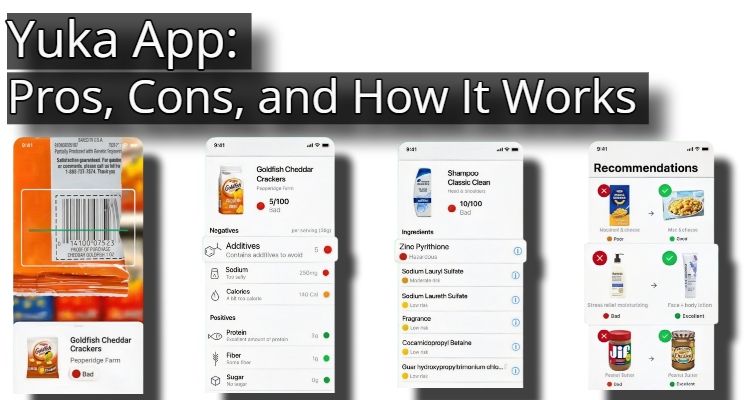
The Yuka app allows users to scan food and personal care product barcodes to evaluate their health impact, providing ratings and detailed information to help users make informed choices. Users also have the option to pay for a premium version that offers additional features.
Website Advertisement

How Does Scanning Product Work on The Yuka App?
- Open the Yuka app and scan the barcode of a food or personal care item.
- The app will analyze the product’s ingredients and assign it a score based on nutritional quality, the presence of additives, and organic status (for food) or a risk analysis of the ingredients (for cosmetics).
- Here is the corrected version:
The app will then provide a rating (color-coded) and detailed information about the product’s composition, including nutritional information, potential risks, and additives.
How Does Yuka Rate Food and Cosmetic Products?
Yuka rates products on a scale of 0 to 100, with 0 being the least healthy and 100 being the healthiest. It scores these items based on nutritional quality, the presence of additives, and—for food—whether it is organic, using a four-tier, color-coded system (green, yellow, orange, and red).
Website Advertisement

How Yuka Rates Food Products
- Nutritional Quality (60%): Evaluates factors like calories, sugar, sodium, saturated fat, protein, fiber, and fruits/vegetables content using the Nutri-Score system.
- Additives (30%): This evaluates the presence and potential risks of additives, with the inclusion of hazardous additives potentially resulting in a lower score.
- Organic Dimension (10%): Consider whether the product is certified organic.
- Color-coded System:
- Excellent (75-100): Dark green.
- Good (50-75): Light green.
- Poor (20-50): Orange.
- Bad (0-25): Red.
- Alternative Recommendations: When a product scores poorly, the app suggests healthier alternatives.
How Yuka Rates Cosmetic Products
- Ingredient Analysis: Each ingredient is analyzed and assigned a risk level based on potential health or environmental impacts: endocrine disruption, carcinogenicity, allergens, irritants, and environmental pollution.
- Risk Categories: “Ingredients are classified into four risk categories: risk-free (green), low risk (yellow), moderate risk (orange), and hazardous (red).
- Color-coded System:
- Good: green.
- Poor: Orange.
- Bad: Red.
Website Advertisement

Pros of the Yuka App
- Yuka provides a clear breakdown of ingredients and their potential health impacts, which can be particularly helpful for understanding additives and allergens.
- Yuka is not funded by brands or manufacturers, ensuring transparency and objectivity in its assessments.
- The app’s scanning feature makes it simple to quickly analyze products while shopping.
- Yuka offers recommendations for healthier product alternatives when a scanned product receives a poor rating.
Cons of the Yuka App
- Yuka’s assessments are based primarily on ingredient analysis, which may not always reflect the overall health impact of a product, especially when considering factors like processing or nutrient content
- The app sometimes lacks specific details on what constitutes overconsumption for certain ingredients, making it difficult for users to gauge their personal risk.
Website Advertisement

Final Thoughts
The Yuka app excellently promotes grocery transparency; however, its rigid rating system often oversimplifies nutritional science.
Download The App And Visit Their Website
| App Store | Google Play | Website |
Disclaimer
I do not work for or represent Yuka. This page was created to provide information about the app.
Website Advertisement
More Health Eating App Reviews
Stay Up to Date with The Site
Follow me on these social platforms for updates on new reviews and more!