Website Advertisement


What Is the PlugShare App?
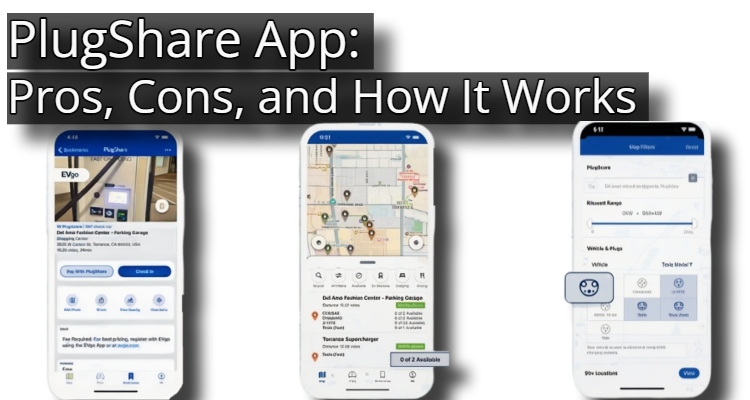
The PlugShare app allows users to find charging stations, leave reviews, and connect with other plug-in vehicle owners.
Website Advertisement

How To Search for Nearby Charging Stations On PlugShare
- Create an account, if you haven’t already.
- Use PlugShare for your mobile device with location services enabled. Using your mobile device will immediately show you any locations near you based on your filter settings.
- Add your vehicle to your PlugShare account. This is the best way to ensure the map filters for plugs that work with your specific vehicle.
- Note: See below to learn what each icon means on the map.
What Each Icon Means On The PlugShare Map
Green Location (Public):
Publicly accessible Level 1 – Level 2 stations/outlets
PlugShare recommends looking into these locations first, as they provide the most options for the most vehicles and are generally straightforward to use.
- These locations will range from 0-50kW in power.
- Charging at these locations will take longer than DC type locations. So, choose a location with amenities that can help you make use of time.
Website Advertisement

Orange Location (High Power):
Publicly accessible high power fast charging locations – CHAdeMO, CSS/SAE Combo or Telsa Superchargers.
- These locations are classified as Level 3 chargers.
- An hour charging session will recharge vehicles to a near-full state in most cases.
- These are typically highly sought-after locations, so make sure they are available before you go.
Brown Location (Restricted):
These locations are car dealerships, private businesses that only allow customers, or hotels that only allow guests to charge.
Gray Location (In Use):
This icon shows locations where all or most available stations are currently in use or unavailable.
Wrench (Under Repair)
The wrench symbol indicates that the location is coming soon or is under repair.
Blue House (Residential)
Home charging stations shared by PlugShare users.
Purple Map (Place)
A specific place on the map.
Green Rating (PlugScore)
The overall score given by users when submitting a rating for a charge location.
Website Advertisement

How To Pay with the PlugShare App
- Launch the PlugShare app.
- If you are at a charging station that supports Pay with PlugShare, tap the alert that appears at the bottom of the map.
- After reviewing the pricing and station information, tap the Pay with PlugShare button.
- Follow the prompts to securely enter your credit card information and start your charing session.
- Use PlugShare to monitor the status of your charging session.
Pros of the PlugShare App
- PlugShare has one of the largest databases of EV charging stations globally, including various networks and even user-added residential chargers.
- The app leverages a large community of EV drivers who contribute reviews, photos, tips, and real-time availability updates.
- The core app is free to download and use, with an optional subscription available for an ad-free experience.
- PlugShare includes information on Telsa Superchargers.
Website Advertisement

Cons of the PlugShare App
- Since the app relies on user contributions, information may not always be perfectly accurate or up to date.
- While PlugShare has a trip planner, it’s not as sophisticated as dedicated EV routing apps.
- Map locations might have minor inaccuracies, making it difficult to find the exact location of a charger, particularly in complex locations like parking garages.
Final Thoughts
PlugShare is a must-have resource for EV drivers due to its robust crowdsourced data and global coverage for finding chargers.
Website Advertisement
Download The App And Visit Their Website
| App Store | Google Play | Website |
Disclaimer
I do not work for or represent PlugShare. This page was created to provide information about the app.
Website Advertisement
Stay Up to Date with The Site
Follow me on these social platforms for updates on new reviews and more!